

A content approval process is the structured sequence of review, feedback, and sign-off that a piece of content moves through before publication. It exists to catch factual, legal, and brand errors while keeping production moving at a predictable pace. The single highest-leverage change any team can make right now is naming one approver of record for every asset, writing down entry and exit criteria for each stage, and logging every decision in an audit trail.
That combination fixes the three failures that sink most workflows: unclear ownership, endless revision loops, and no record of who signed off on what. Teams that adopt it typically see fewer review cycles fairly quickly.
Watch for these signals early on:
- A low number of revision rounds per asset
- Reviewers responding reliably within their assigned SLA window
- No assets published without a named, logged approval
Key Takeaways
A content approval process works when one named approver, written entry and exit criteria, and an automatic audit trail replace informal, ad hoc sign-off.
| Point | Details |
|---|---|
| Name one approver | Assign a specific person, with a backup, as the final decision-maker for every asset. |
| Write checkable criteria | Replace subjective feedback with entry and exit conditions reviewers can verify. |
| Route by risk level | Reserve full multi-reviewer paths for high-risk content; keep low-risk assets fast. |
| Track five core metrics | Monitor cycle time, first-pass approval rate, revisions per asset, queue age, and SLA compliance. |
| Pilot before scaling | Run four to six assets through a new workflow before rolling it out company-wide. |
Table of Contents
- What Are the Core Stages of a Content Approval Process?
- Who Owns Each Step, and How Do You Write Criteria?
- Which Tools Actually Speed Up Content Review?
- What Best Practices Actually Shorten the Approval Cycle?
- What Templates Make Approval Routing Concrete?
- Which Metrics Reveal a Broken Approval Workflow?
- How Do You Roll Out a New Approval Process?
- What Collab Only Resources Support This Workflow?
- How Should Teams Handle Stakeholder Feedback?
- What Compliance Steps Belong in Content Approval?
- Grow Faster with Collabonly's Creator Network
- What the Data Actually Tells Us About Approval Speed
- Sources
- FAQ
What Are the Core Stages of a Content Approval Process?
Every functioning content review workflow, regardless of team size, moves through five recognizable stages. Skipping one is usually where things break down, according to guidance on content approval workflow structure.
- Brief and draft. The creator receives a written brief (audience, goal, format, deadline) and produces a first draft. Entry criteria: approved brief exists. Exit criteria: draft meets the word count, format, and sourcing requirements listed in the brief.
- Functional review. Editorial, SEO, legal, or subject-matter reviewers assess the draft against their own lane. Entry criteria: draft passes automated checks (spelling, required fields, banned terms). Exit criteria: each reviewer records a decision state, not just comments.
- Consolidation and revision. A review lead merges feedback into a single revision list and resolves conflicting notes before the creator sees them. Entry criteria: all functional reviews are complete. Exit criteria: one clean list of required changes, no duplicate or contradictory notes.
- Final decision. The approver of record reviews the revised asset against the original brief and either approves it or sends it back with specific, itemized reasons. Entry criteria: revision list fully addressed. Exit criteria: recorded approval decision with timestamp.
- Schedule, publish, and record. The publisher schedules the asset, confirms it renders correctly in staging, and the system logs the final audit entry. Exit criteria: live URL confirmed and audit record closed.
Most approval workflows compress into these same four or five checkpoints, as Smartsheet's breakdown of content approval steps also confirms: briefing, internal review, final approval, and publish with feedback loop. Add specialist reviews (legal, accessibility, regulatory) only when the content type actually carries that risk. A blog post about internal culture rarely needs legal sign-off; a paid claim about product performance almost always does.
Who Owns Each Step, and How Do You Write Criteria?
Ambiguous ownership is the most common reason a review workflow stalls. Assign these roles by name, not by title, for every project:
- Creator drafts the asset and owns the first revision pass.
- Review lead collects and reconciles feedback from all functional reviewers into one list.
- Editorial reviewer checks tone, clarity, and brand voice.
- Subject-matter expert (SME) verifies technical or factual accuracy.
- Legal reviewer checks claims, disclosures, and licensing where relevant.
- Approver of record makes the binary go/no-go call.
- Publisher schedules, posts, and closes the audit record.
A named person, not a department, must hold the approver role. "Marketing" cannot approve anything. Sarah, backed up by James when she is out, can. Written entry and exit criteria stop reviewers from grading on feel: an editorial review might enter only after automated grammar checks pass and exit only once the asset matches the brief's tone guidelines. An SEO review enters with a target keyword list and exits when on-page elements meet the checklist. Legal review enters when a claims list is attached and exits when every claim is either sourced or removed. As one workflow analysis notes, a clear brief paired with defined entry and exit criteria is what actually reduces ambiguous back-and-forth feedback.
Pro Tip: Write exit criteria as checkable statements, not opinions. "Meets AA accessibility contrast ratios" is checkable. "Feels accessible" is not.
Which Tools Actually Speed Up Content Review?
Five tool categories cover almost every approval workflow need, and most teams already own at least two of them without using them well.
- CMS staging previews let reviewers see content exactly as it will publish, catching layout and formatting issues before they reach the approver.
- Annotation and review widgets attach comments directly to text, images, or design elements instead of scattering feedback across email threads.
- Workflow and approval platforms route assets automatically based on content type, assign SLAs, and record every decision state.
- Collaboration tools (shared docs, chat) handle the informal back and forth that happens between formal review stages.
- Automation and webhooks trigger notifications, escalate overdue reviews, and kick off publishing once the final approval lands.
Automate the first-pass checks before automating anything else: brand vocabulary compliance, required metadata fields, image rights confirmation, and basic regulatory flags. A scalable approval workflow needs intake, automated first-pass checks, tiered human review, and a defined approval gate working together, which frees human reviewers to focus on judgment calls rather than checklist items a script can handle.
Whatever platform you choose needs four technical capabilities: a canonical preview link everyone reviews from, an automatic audit log, version history, and SLA-based escalation notifications. Approval workflow software that supports rule-based routing and integrates with your systems of record makes the audit trail a byproduct of normal use rather than a separate task someone has to remember to do. Teams exploring collaboration tooling to cut review friction can also look at practical content collaboration tips for marketers and creators for lower-cost fixes before buying new software. Platforms built for content marketing automation can also handle a meaningful share of first-pass checks as content volume grows.
What Best Practices Actually Shorten the Approval Cycle?
- Assign one final approver per asset, with a named backup for absences. Two people who can both say yes creates confusion about who actually said yes.
- Set an SLA for every stage, not just the final decision. A 48-hour SLA on functional review with automatic escalation to a backup reviewer keeps assets from sitting untouched in a queue.
- Route by risk, not by habit. A routine social caption does not need the same five-person review as a regulated product claim. Over-reviewing low-risk content is the single biggest hidden cost in most workflows.
- Separate review from approval. Review improves the asset; approval is a binary gate that moves it forward. Blurring the two means reviewers start feeling entitled to block publication, and approvers start re-litigating content decisions that were already settled.
- Consolidate feedback through one review lead rather than letting the creator field five separate comment threads. Never let two versions of the same asset circulate for review simultaneously.
Common pitfalls, and the one-line fix for each:
- No named approver: assign one person by name today, not "the marketing team."
- Undefined exit criteria: write checkable pass conditions before the next asset enters review.
- Reviewers commenting outside their lane: restrict each reviewer's access to their assigned criteria only.
- Feedback arriving in five different threads: route all comments through the review lead before they reach the creator.
Pro Tip: If an asset has been revised more than three times, stop and ask whether the entry criteria were unclear from the start rather than blaming the creator.
What Templates Make Approval Routing Concrete?
A routing matrix tells creators and reviewers exactly which path an asset takes before anyone starts working on it.
| Risk Level | Example Content | Recommended Reviewer Path |
|---|---|---|
| Low | Social captions, internal updates | Creator plus one editorial reviewer |
| Medium | Blog posts, product descriptions | Editorial, SEO, and SME review before approver sign-off |
| High | Paid claims, regulated topics, press statements | Editorial, SME, legal review, then approver of record |
Decision states remove guesswork about what happens next:
- Approved — asset moves to publish queue.
- Conditionally approved — asset publishes once specific, listed edits are confirmed.
- Changes requested — asset returns to the creator with an itemized list.
- Rejected — asset does not move forward in its current form; often triggers a new brief.
- Expired — asset sat in a stage past its SLA and needs reassignment.
This concise set of decision states removes the ambiguity that turns a comment thread into a stalled asset. A short reviewer checklist keeps each function focused: editorial checks tone and clarity against brand guidelines; SEO checks keyword placement and metadata; legal checks claims and disclosures; accessibility checks alt text and contrast ratios. Collab Only's own content creation checklist for marketing teams offers a version of this you can adapt directly.
Which Metrics Reveal a Broken Approval Workflow?
Five numbers tell you almost everything about whether your content review workflow is healthy:
- Cycle time — total time from draft submission to final approval.
- First-pass approval rate — percentage of assets approved without a revision round.
- Revisions per asset — average number of feedback cycles before approval.
- Queue age — how long an asset has sat untouched at its current stage.
- SLA compliance — percentage of reviews completed within their assigned window.
A minimum viable dashboard tracks these five numbers weekly, broken out by content type and by reviewer. That granularity matters because average figures hide which stage is actually the bottleneck.
To find the bottleneck, run a simple diagnostic query: per-stage SLA miss rates, sorted from highest to lowest. Whichever stage misses its SLA most often is where the process is actually breaking, not necessarily where people assume it's breaking. A tiered review structure by content type, as Smartsheet recommends, tends to lower cycle time because low-risk assets stop competing for the same reviewer bandwidth as high-risk ones.
How Do You Roll Out a New Approval Process?
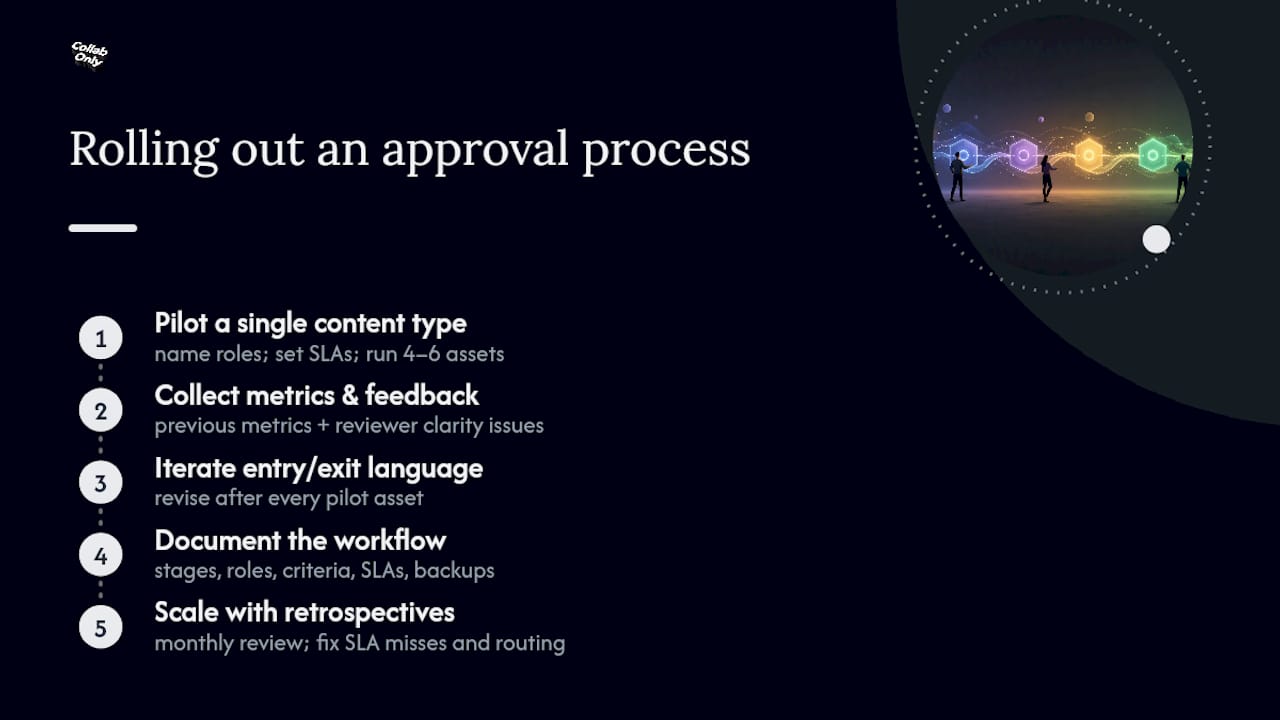
Start with a pilot, not a company-wide mandate. Pick one content type, usually blog posts or social captions, and name every role before a single asset enters the flow: who drafts, who reviews, who approves, who publishes. Set an SLA for each stage and run four to six assets through it before touching anything else.
During the pilot, collect two things: the metrics from the previous section and direct feedback from reviewers about where the criteria felt unclear. This is where most teams discover their exit criteria were too vague. "Reads well" is not an exit criterion; "matches the three brand voice examples in the style guide" is. Iterate the entry and exit language after every pilot asset, not just at the end.
Once the pilot produces consistent cycle times and a stable first-pass approval rate, document the workflow in writing: stages, roles, criteria, SLAs, and escalation paths. Train reviewers on the documented version rather than the version that existed only in Slack messages. Configure backups for every role so one person's vacation doesn't stall the queue.
Schedule a monthly retrospective once you scale beyond the pilot. Review the metrics dashboard, ask which stage missed SLA most often, and adjust routing or staffing accordingly. A staged pilot with a small asset batch validates whether your SLAs and criteria actually hold before you commit the whole organization to them, which is far cheaper than discovering a flaw after rollout. For a longer view of how this fits into broader production planning, Collab Only's content development workflow guide walks through the same staged approach in more detail.
What Collab Only Resources Support This Workflow?
Collab Only publishes several templates that map directly onto the stages above rather than requiring you to build them from scratch.
- The brand awareness campaign brief template covers the brief stage and its entry criteria for creator-facing projects.
- The content creation checklist adapts into a reviewer checklist for the functional review stage.
- The step-by-step content collaboration guide supports the rollout and scaling steps described above.
Adapt the field names and criteria in these templates to match your own risk tiers rather than adopting them unchanged.
How Should Teams Handle Stakeholder Feedback?
Feedback chaos, not slow reviewers, is what actually kills most content timelines. The fix is structural: route every comment through the review lead before it reaches the creator, and never let stakeholders comment directly on a live draft outside their assigned lane.
Give each stakeholder group a defined scope before they see the asset. A legal reviewer comments on claims and disclosures, not word choice. A brand stakeholder comments on tone, not legal exposure. When someone comments outside their lane, the review lead redirects it rather than passing it straight to the creator, which prevents the creator from fielding five contradictory notes on the same paragraph.
Set expectations about response format up front: itemized, specific, and tied to the actual brief. "This doesn't feel right" is not actionable feedback; "this claim needs a source per the brief's fact-check requirement" is. Reviewers who receive training on this format tend to produce feedback that resolves in one round instead of three.
Close the loop after publication, too. A brief note to stakeholders confirming what published and why certain feedback wasn't incorporated builds trust for the next cycle and reduces the instinct to over-comment next time out of uncertainty about whether their input mattered at all.
What Compliance Steps Belong in Content Approval?
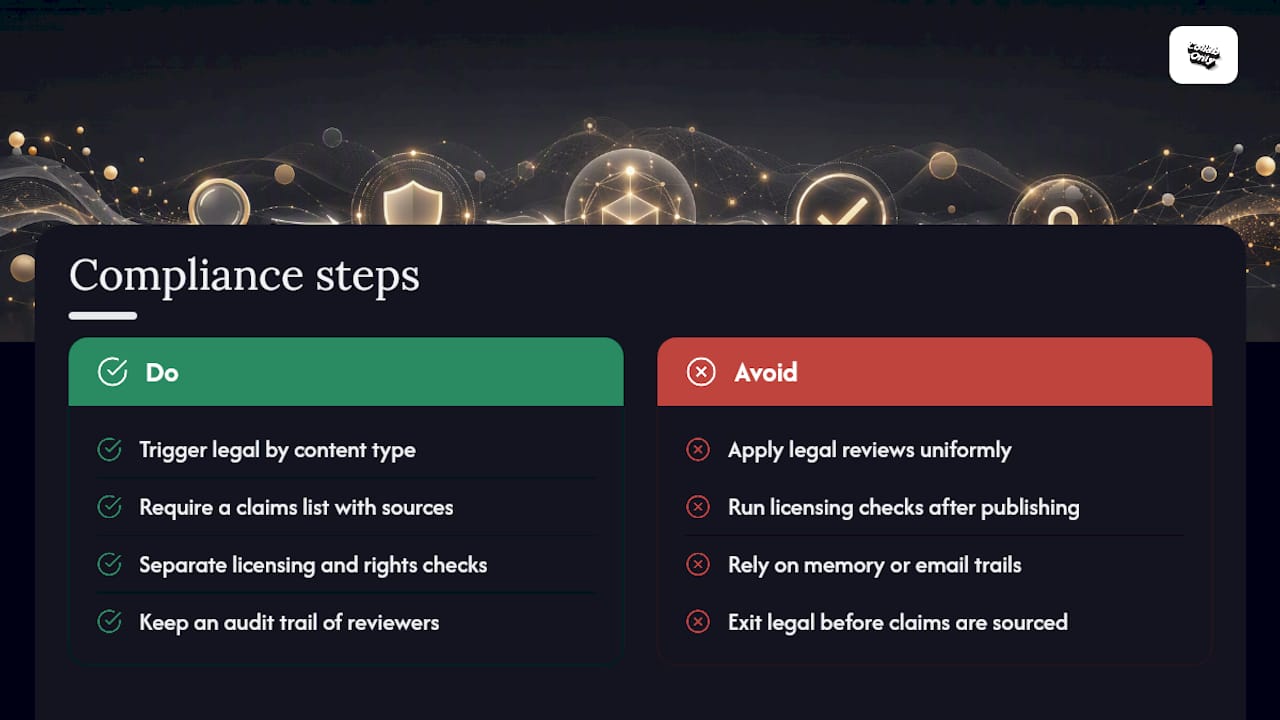
Legal and compliance review should be triggered by content type, not applied uniformly to everything that moves through the workflow. Regulated claims, health or financial statements, and anything involving a named third party need a legal checkpoint before publication; a routine blog explainer generally does not.
Build a claims list as a required field before legal review begins. Every factual or comparative claim in the asset gets logged with its source, and legal review exits only once each claim is either sourced or removed. This turns legal review from a subjective judgment call into a checkable process, which is exactly what reduces the back-and-forth that makes legal review feel slow.
Licensing and rights checks deserve their own line item, separate from legal review of claims. Confirm image rights, quoted material permissions, and influencer or creator usage rights before an asset reaches final approval, not after it publishes. A robust audit trail that records who reviewed what, on which version, and when is what actually protects a team when a compliance question surfaces months after publication. Without that record, a team is reconstructing history from memory and email searches instead of pulling a clean log.
Where regulatory requirements vary by content type or platform, keep those requirements documented in your entry criteria rather than relying on a reviewer to remember them case by case.
Grow Faster with Collabonly's Creator Network
A tight approval workflow protects content quality, but it only matters if the content itself connects with the right audience. Collabonly's nano-influencer marketing platform helps brands match with creators whose audiences already trust them, using a swipe-based interface and instant chat that skips the slow email back-and-forth typical of influencer outreach. Once your approval process is running smoothly, pairing it with a reliable creator pipeline through Collabonly turns every approved asset into a partnership opportunity instead of a one-off post.
What the Data Actually Tells Us About Approval Speed
Most advice on this topic treats every stage as equally important, and that's the part I think gets it wrong. Not every asset deserves five reviewers and a legal sign-off. The teams that move fastest aren't the ones with the leanest process on paper; they're the ones that route ruthlessly by risk and save their scrutiny for content that actually carries exposure.
The conventional playbook also underweights the audit trail, treating it as a compliance afterthought rather than a design requirement. Build it into the workflow so it captures itself, and you never have to reconstruct who approved what after the fact. Bolt it on later, and you're stuck combing through Slack messages during exactly the moment you can least afford to.
If you take one thing from this, it's sequencing: name the approver and write the criteria before you touch a single tool. Software can enforce a process that already exists. It cannot invent one for you. Pilot small, measure the five metrics that matter, and scale only once the numbers hold steady across a few dozen assets, not a few.
— Samuel
Sources
- Kontent
- Content Approval Workflow: Steps, Tips, and Tools for Teams - Smartsheet
- Content Approval Workflow: 5 Stages and Free Tracker - Apaya
- Marketing Content Approval Workflow | Markup AI
- Approval Workflow Software for Enterprise IT | Kissflow
FAQ
What Is Content Approval?
Content approval is the formal sign-off step where a designated person confirms an asset meets its brief, is factually accurate, and is ready to publish.
What Are the Steps of the Approval Process?
Most workflows move through five stages: brief and draft, functional review, consolidation and revision, final decision, and schedule/publish with a recorded audit trail.
What Is the Content Review and Approval Process?
Review improves the asset through editorial, legal, or SME feedback, while approval is the separate, binary decision that advances the asset to publish-ready status.
What Is the Social Media Content Approval Process?
It follows the same core stages as any content type, but social posts usually route through a lighter path, often just a creator and one editorial reviewer, unless the post touches a regulated claim or partnership disclosure.