

Instagram partnership ads let a brand run paid promotion on a creator's organic content while the post keeps the creator's name, handle, and profile picture attached. The brand adds targeting, budget, and optimization on top; the creator's audience still sees a familiar voice, not a repainted ad unit. Three things need to happen before the first one goes live:
- The creator enables branded content tools, publishes the collaboration post, and either toggles "Allow brand partner to boost" or generates an ad code.
- The brand accepts the tag, confirms permissions in Meta Ads Manager or the Partnership Ads Hub, and pastes the code (or selects the approved post).
- Both sides agree on format ahead of time. Reels, feed posts, Stories, and carousels are all supported placements, though Reels currently carries the strongest delivery signal.
Skip any one of those steps and the ad simply will not launch, regardless of how good the creative is.
Key Takeaways
Instagram partnership ads work by pairing a creator's organic credibility with a brand's targeting and budget, and the entire system depends on permissions being set correctly before launch.
| Point | Details |
|---|---|
| Permission comes first | Creators must enable branded content tools and either toggle boost access or generate an ad code before any ad can run. |
| Choose the right permission level | Post-level ad codes suit one-off campaigns; account-level Partnership Ads Hub access suits ongoing creator programs. |
| Wait before you spend | Give organic posts 24 to 48 hours to gather saves and shares before promoting, since that signal predicts paid performance. |
| Treat it as performance media | Track CTR, CPA, ROAS, and saves/shares, and test creative, identity display, and audience segments separately. |
| Collabonly speeds discovery and rights setup | Matching and instant chat let brands confirm ad permissions and terms before content is filmed, cutting setup delays. |
Table of Contents
- What Are Instagram Partnership Ads?
- How Do You Set Up a Creator-Brand Collaboration?
- How Do You Run a Partnership Ad in Meta Ads Manager?
- How Should You Optimize and Measure Partnership Ads?
- What Are the Compliance and Rights Requirements?
- How Do You Fix Common Partnership Ad Problems?
- How Collabonly Streamlines Creator Partnership Programs
- Find Creators Ready to Build Paid Partnerships With You
- Sources
- FAQ
What Are Instagram Partnership Ads?
A partnership ad is a paid promotion built from a creator's branded content post, run through the brand's ad account, with the creator's identity displayed in the ad header. Instagram's own documentation on partnership ads describes this dual-identity structure as the defining feature that separates it from a standard brand-run ad. The disclosure is not optional: every eligible post carries a "Paid Partnership with [Creator]" label, satisfying the platform's branded content policy automatically once the tag is accepted.
Partnership ads run across the same placements as regular Instagram ads: Reels, feed, Stories, and carousels, with in-stream video available where the format is supported. What changes is the signal Meta pulls from. Instead of relying only on the brand's pixel and audience history, the algorithm factors in engagement patterns from the creator's account too, which is why creator-led placements often outperform brand-only creative on cost per result.
It helps to separate this from two things marketers frequently confuse it with:
| Approach | What happens | Who controls the ad |
|---|---|---|
| Partnership ads | Brand runs paid media against a tagged creator post; dual identity shows in the header | Brand, with creator permission |
| Simple boosting | Creator or brand pushes a small budget behind an organic post from the creator's own account | Creator |
| Whitelisting / allowlisting | Brand runs ads that look like they come from the creator's account, often without a visible dual label | Brand, using creator's identity |
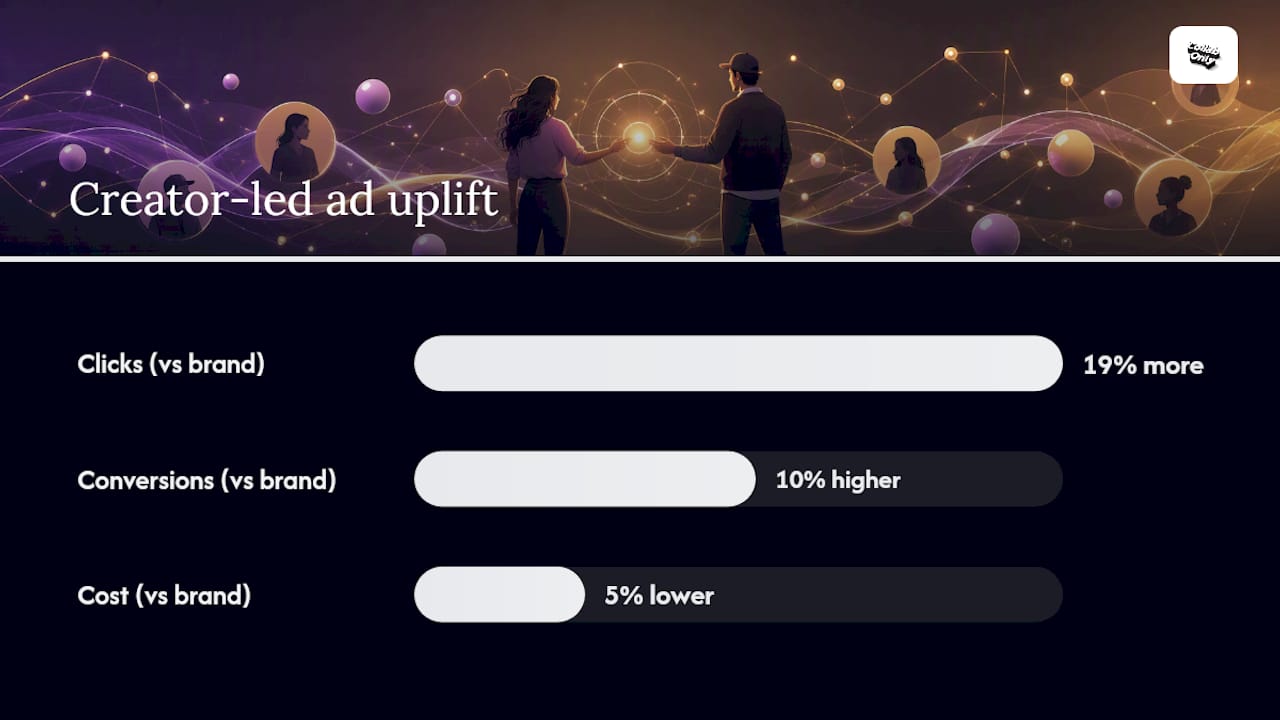
Partnership ads sit between those two. They give brands real targeting control without stripping the creator's name off the asset, which is part of why the format has scaled so fast: Forbes reported Meta Partnership Ads reached a $10 billion annual run rate, with an analysis of $130 million in spend showing creator-led ads produced 19% more clicks and 10% higher conversions at 5% lower cost than brand-only messaging.
How Do You Set Up a Creator-Brand Collaboration?
Getting permissions right before launch saves you from the most common cause of delayed campaigns: a post that looks ready but was never actually authorized for paid media. Split the checklist by who owns each step.
Creator actions, in order:
- Confirm the account is set to Professional (Creator or Business); personal accounts cannot access branded content tools.
- Enable branded content tools in the account's business settings, per Instagram Creators' partnership ads documentation.
- Publish the collaboration post and tag the brand as a paid partner, which triggers the disclosure label automatically.
- Toggle "Allow brand partner to boost" inside the post's branded content settings, or generate a dedicated ad code for the brand to use.
Brand actions, in parallel:
- Enable branded content approvals inside Business Suite so incoming partner tags don't sit unreviewed.
- Approve the creator directly, or request account-level access through the Partnership Ads Hub if you plan to run multiple posts from the same creator over time.
- Confirm the connected ad account has an active payment method and that the Business Manager linkage between brand and creator page is live, a step Meta's own guidance on partnership ads flags as a frequent setup gap.
The choice between post-level and account-level permission is not cosmetic. An ad code authorizes one specific post for one specific campaign; it expires, and every new post needs a fresh one. The Partnership Ads Hub grants standing account-level access, so a brand running quarterly creator programs doesn't re-request approval every time. Marvant's guide to Partnership Ads Hub workflows notes that account-level permissions remove a recurring bottleneck for advertisers managing more than a handful of creators at once. For a one-off campaign, the ad code is faster to set up. For anything ongoing, the Hub pays for itself in saved coordination time.
Before either side touches Ads Manager, run through a short hygiene pass: captions match what legal or brand safety approved, product tags point to the current landing page, UTM parameters are attached for tracking, and the conversion pixel or Conversions API event is firing correctly on the destination page. A broken link at this stage doesn't show up until you're already spending against it.
Pro Tip: Don't promote the moment the organic post goes live. Strike Social's setup guidance recommends waiting 24 to 48 hours to see how saves and shares perform organically first. Posts that gather strong unpaid engagement in that window tend to convert better once you put budget behind them, and it gives you a natural filter for which creator assets deserve real spend.
How Do You Run a Partnership Ad in Meta Ads Manager?
The campaign and ad set structure you already know doesn't change. Objective selection, budget, and audience targeting all live at the same levels they always have. What's new is a single ad-level toggle.
- Build the campaign as usual, choosing an objective, engagement, traffic, or conversions, that matches the campaign's actual goal.
- Set audience, placement, and budget at the ad set level exactly as you would for any other campaign.
- At the ad level, switch on "Partnership ad" before selecting creative.
- Choose your identity setup: creator-only header, a combined brand-and-creator header, or dynamic identity optimization, which lets Meta test both and serve whichever performs better for a given user.
- Paste the ad code the creator generated, or, if account-level permission is active through the Partnership Ads Hub, select the approved post directly from the list of eligible creator content.
- Preview the ad exactly as it will appear, dual identity header included, before submitting.
There are two distinct creative paths worth knowing. You can promote the creator's existing organic post as-is, preserving its comments and engagement history, or build new ad creative under the creator's identity without an existing post attached, an option Leadsie's Ads Manager walkthrough covers for brands running always-on creator programs rather than one-off boosts.
A few things to check before submitting:
- Confirm the creator's tag was accepted, not just sent; pending tags block the ad from entering review.
- Run the ad preview on both feed and Reels placements if you're using automatic placements, since the dual-identity header renders slightly differently across formats.
- Standard ad review timelines apply. Build in a buffer if your campaign has a hard launch date.
How Should You Optimize and Measure Partnership Ads?
Treat a partnership ad like performance media, not like a sponsorship you're hoping works out. That means tracking the same funnel metrics you'd apply to any paid unit: click-through rate, conversion rate, cost per acquisition, and return on ad spend, plus two that matter more here than in standard brand ads, saves and shares, which tend to predict downstream performance better than likes.
Audience construction benefits from layering, not guessing:
- Start with the creator's engaged audience as a seed for lookalikes.
- Layer interest and behavioral targeting on top rather than running broad.
- Retarget people who watched a threshold percentage of the creator's video or engaged with the post organically.
- Track lifetime value and repeat purchase rate downstream, not just first-touch conversion, since creator-driven traffic often skews toward higher intent.
For testing, isolate one variable at a time: creative format (Reels against feed), identity display (creator-only against combined header), audience segment, and bid strategy. Give each test enough budget and time to exit the learning phase before judging results, and lean on the 24 to 48 hour organic window mentioned earlier as an early signal before committing bigger spend.
The Agentio analysis Forbes cited found creator-led ads delivered 19% more clicks and 10% higher conversions at 5% lower cost than brand-only messaging across a $130 million spend sample, a strong argument for shifting a meaningful test allocation toward creator-led ads rather than treating them as a side experiment. Reviewing branded content strategies tied to measurable ROI is a useful next step once your first test batch has data behind it.
What Are the Compliance and Rights Requirements?
The Paid Partnership label isn't a formality; it's the mechanism that keeps the ad compliant with platform disclosure policy. If a brand doesn't accept a creator's tag, the post cannot run as a partnership ad, full stop, no workaround exists on Meta's side.
Before signing off on any partnership ad agreement, confirm these contract items explicitly:
- Usage window: how long the brand can run paid media against the asset.
- Territories: which countries or regions the ad rights cover.
- Rights scope: post-level ad code versus account-level Partnership Ads Hub access, since these carry different negotiated value.
- Exclusivity terms, if the brand wants the creator to hold off on competing partnerships during the flight.
- Revocation terms: what happens if either party ends the arrangement early.
- Payment schedule tied to deliverables, not just posting dates.
InfluencerFee's guide to branded content pricing points out that total campaign cost is the creator's content fee plus whatever media budget the brand spends behind it, and that creators commonly negotiate a separate premium specifically for granting paid usage rights. Build that into budgeting conversations early rather than after the creative is finished.
Platforms enforce branded content disclosure rules at the account level, and repeated non-disclosure can affect a creator's standing with monetization tools, not just the single post in question.
How Do You Fix Common Partnership Ad Problems?
Most partnership ad failures trace back to one of four causes, and each has a fast diagnosis.
- Invalid or expired ad code: Codes tied to a specific post expire after a set window. Confirm the code format matches what the creator's dashboard generated, and request a fresh one if the campaign has been paused and relaunched.
- Creator revoked permission: Check the branded content settings on the original post; a revoked toggle removes the brand's boost eligibility instantly, even mid-flight.
- Post removed or set to private: A partnership ad cannot run against content that no longer exists publicly. Verify visibility settings before troubleshooting anything else.
- Brand tag never accepted: A pending tag looks identical to an accepted one in the feed, but only an accepted tag unlocks ad eligibility. Check Business Suite directly.
Run through account linkages in Business Suite and confirm the ad's review status before assuming the creative itself is the problem.
Pro Tip: Keep a simple log of every ad code issued, which post it maps to, and its expiry date. Programs running multiple creators at once lose more time to mismatched or expired codes than to any creative or targeting issue.
How Collabonly Streamlines Creator Partnership Programs
A repeatable workflow beats reinventing the process for every new creator: discovery, then a brief with clear terms, then permission setup (deciding post-level versus account-level access), then a small test budget, then scaling what performs.
- Discover creators matched to campaign goals rather than manually screening profiles one by one.
- Confirm terms and ad rights directly in chat, before content is even filmed.
- Set up permissions, and reuse the same request template for every new collaboration.
- Run a test budget, then scale the ads that clear your KPI thresholds.
Collabonly's swipe-based matching shortens the discovery step considerably, and instant chat on a match means rights conversations, usage window, exclusivity, ad code timing, happen before either side is locked into a shoot date. A practical guide to matching creators and brands covers the discovery side of this workflow in more depth.
What one brand learned from running partnership ads at scale
The biggest shift wasn't creative, it was patience with testing cycles. Early campaigns launched ads the moment a creator post went live, and results were inconsistent. Once the team started waiting the full 24 to 48 hours to check organic saves and shares before committing budget, win rates on which creator assets to scale improved noticeably. The lesson: let the organic post tell you something before you pay to amplify it.
Find Creators Ready to Build Paid Partnerships With You
Slow approvals, mismatched ad codes, and endless DM threads chasing creator sign-off are the real bottleneck in most partnership ad programs, not the ad setup itself. Collabonly is built to remove that friction from the front end: brands swipe to match with creators already open to paid collaboration, confirm ad rights and usage terms in instant chat before content is even filmed, and keep permission details in one place instead of scattered across emails.
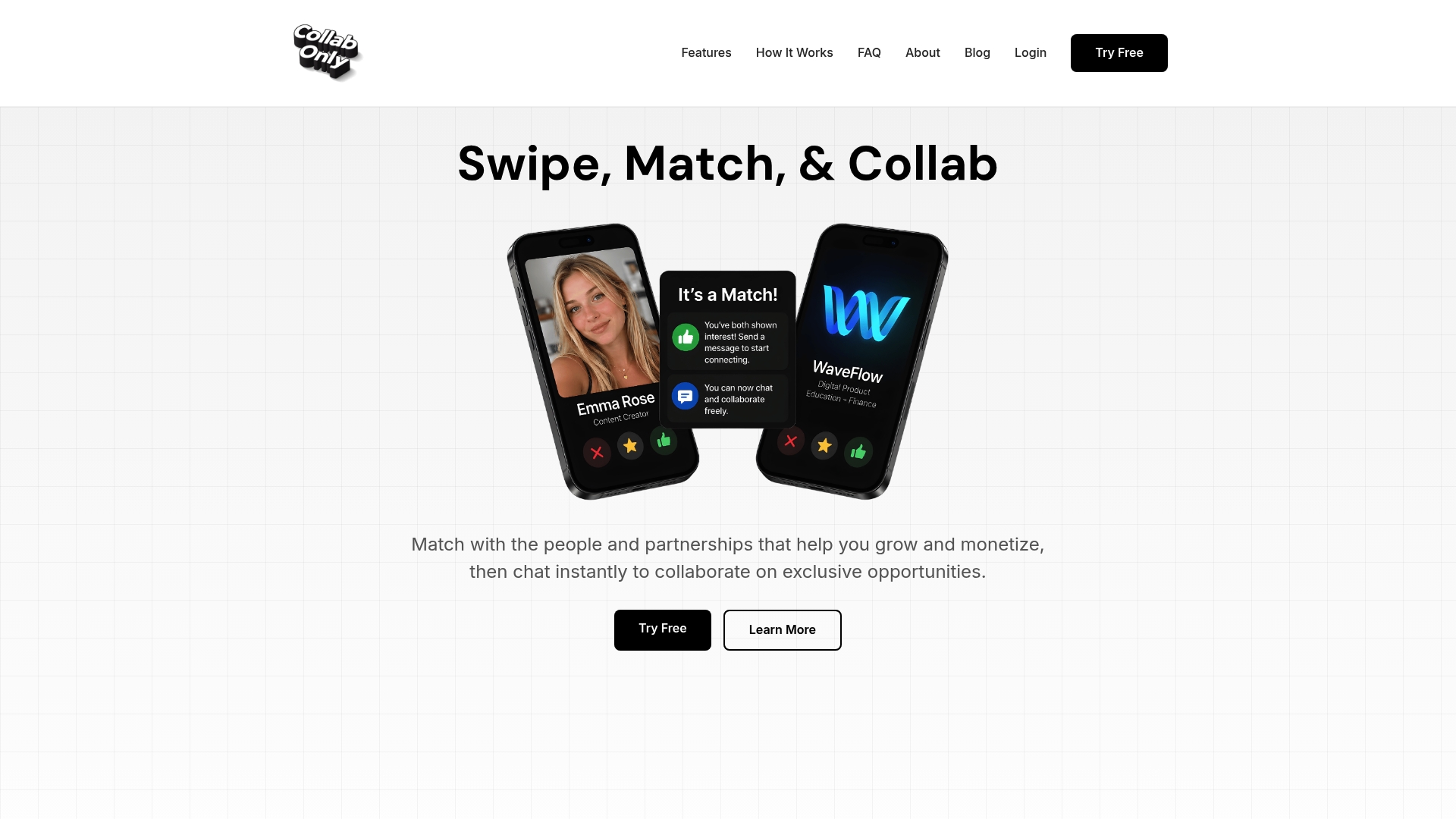
That matters most in three spots this guide already covered: discovery (finding creators whose audience actually fits your targeting, not just anyone with a following), rights negotiation (agreeing on post-level versus account-level access before the shoot, not after), and tracking (knowing which ad codes are live and which have expired). Collabonly handles all three inside one platform instead of three disconnected tools.
If you're building an app promotion campaign and need creators who already speak to that audience, start with Collabonly's app promotion creator discovery page and match with someone ready to collaborate today.
Sources
- Meta Partnership Ads Hit $10 Billion As Creators Outperform Brand Messages
- How to Run Partnership Ads on Instagram: Setup and Strategy
- About partnership ads
- Partnership Ads
- Instagram Branded Content Ads: Pricing, Setup, and Performance Guide
FAQ
What does it mean to run partnership ads on Instagram?
It means a brand pays to promote a creator's branded content post through its own ad account, with the creator's name and profile still displayed as part of the ad. The creator must grant permission first, either through an ad code or account-level access.
How do I get partnership ads set up on Instagram?
The creator enables branded content tools, publishes a tagged post, and grants permission via an ad code or the "Allow brand partner to boost" toggle. The brand then accepts the tag and builds the ad in Meta Ads Manager, switching on the partnership ad toggle at the ad level.
Is it worth adding a paid partnership label on Instagram?
Yes. The label is required for compliance, and creator-led ads with this dual identity have outperformed brand-only messaging on clicks and conversions in analysis Forbes reported on Meta Partnership Ads.
How do I grant permission for partnership ads on Instagram?
Creators grant permission by generating a post-specific ad code or by approving account-level access through the Partnership Ads Hub, which lets a brand run multiple posts without repeating approval each time.
What's the difference between partnership ads and regular influencer marketing?
Regular influencer marketing typically relies on organic reach and a flat sponsorship fee. Partnership ads add paid distribution and targeting control on top of that same creator content, which is why platforms like Collabonly focus on speeding up the discovery and rights-confirmation steps that make paid amplification possible.